
Waseet runs an insurance brokerage end to end: clients, policies, renewals, quote requests, commissions, claims and reports in one place, Arabic first.
The setup wizard (5 steps)
- 1Workspace profile: company name, FRA license number, logo and default language (the time zone is fixed to Cairo).
- 2Lines of business: turn on only the lines you write (motor, property, group medical, life…) so lists stay short.
- 3Insurers: pick the companies you work with from the list and set the default commission % per line.
- 4Team: invite colleagues by email and choose each person's role.
- 5Templates & reminders: review the WhatsApp / email messages and when reminders fire before a policy ends.
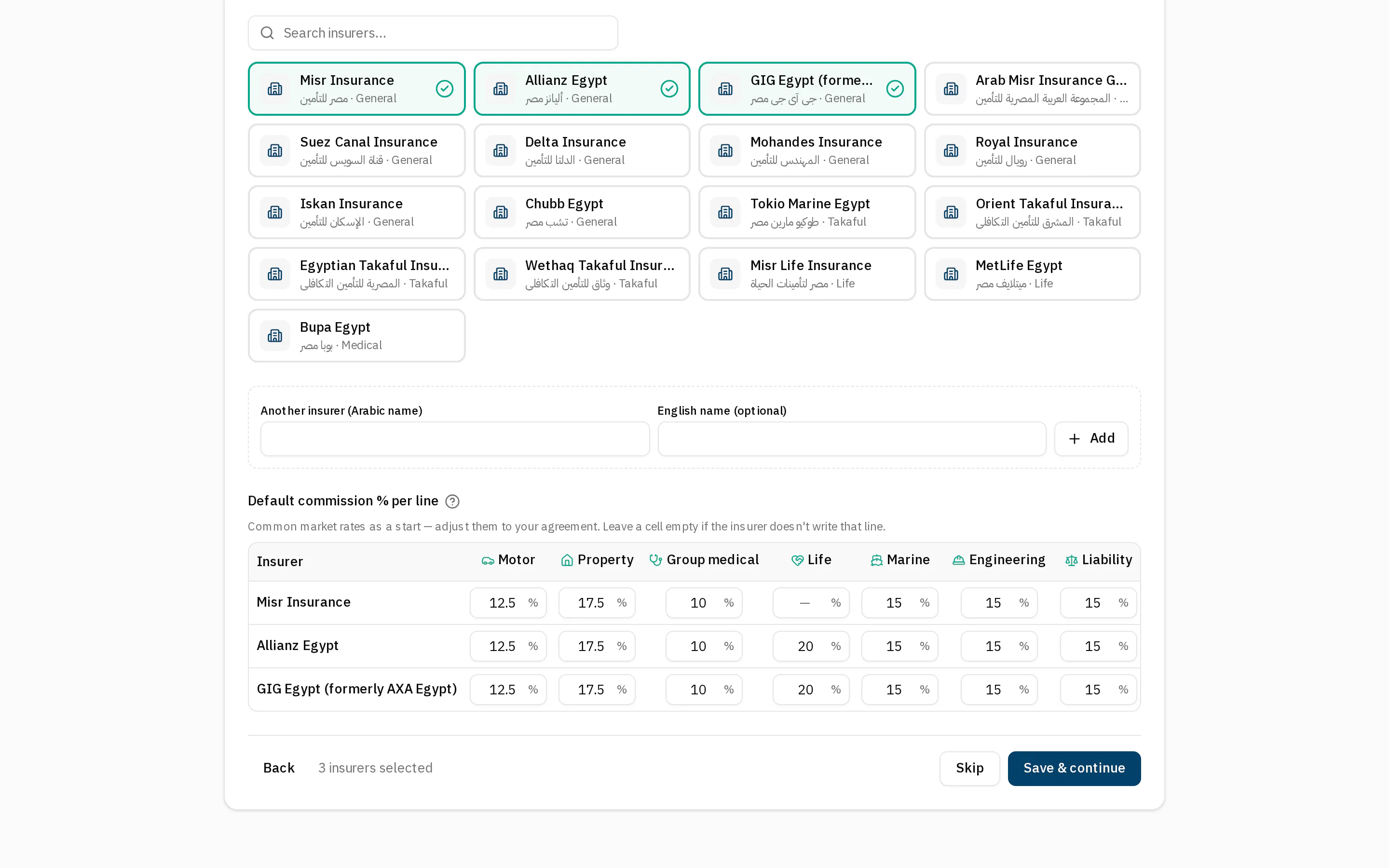
- 1Pick your insurers
- 2An insurer not in the list
- 3Commission % per line
You can skip any step and come back later from the “Getting started” card on the dashboard or from Settings.
Explore with sample data
“Load sample data” adds realistic clients, policies, claims and commissions so every screen has something to show. Everything it adds is flagged as sample and can be removed in one click from Settings → Workspace.
Removing sample data also removes anything you added on top of it (e.g. a policy for a sample client). Enter your real data after removing it.
Product tours
The first time you open each module a short tour points at the important buttons. Replay it any time from the help (?) button in the top bar.